
Amenities, Services and Maintenance
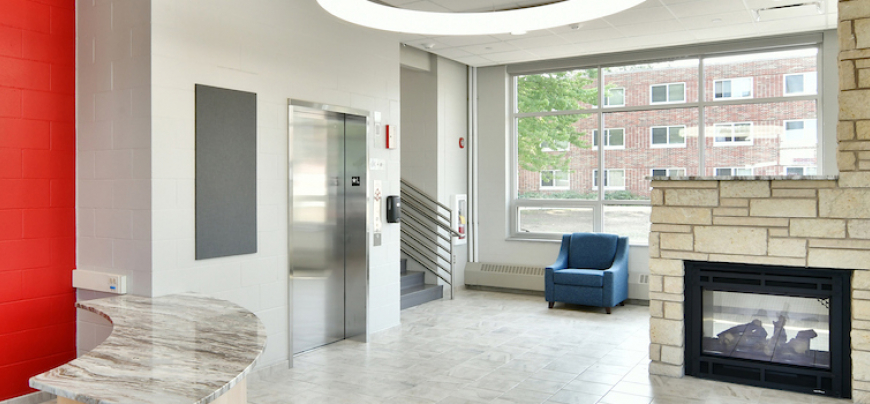
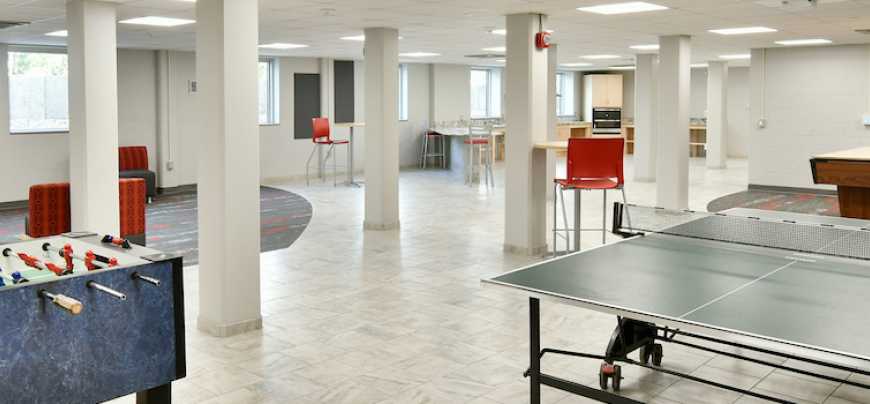
Living on campus comes with perks you may not even realize! In addition to being just minutes away from your classrooms, dining and recreation options, your residence hall is designed to provide you with everything you need to be successful in your "home away from home."
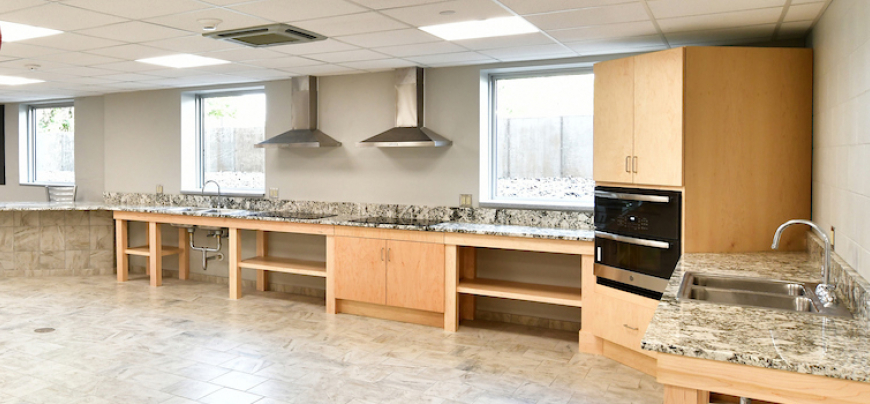
Every residence hall has a variety of common spaces for students to use, including media rooms, study rooms and kitchens. Just remember, if you plan on using a residence hall kitchen, you'll need to supply your own kitchen supplies! Learn more about your room design and furnishings.
Residence Halls
Bicycle Storage and Maintenance
Storage:
- Bikes are welcomed on campus, however, they aren't allowed to be stored inside the residence halls. Bike racks are located on each side of campus, adjacent to the residence halls.
- A limited number of enclosed bike lockers are available for rent near the residence halls on a first-come, first-served basis. Fill out the Bike Locker Rental Agreement Form to reserve a bike locker. The cost is $60 per academic year and $25 for the summer.
Location:
- West side lockers: Johnson, Hathorn, May, Prucha, Stratton
- East side lockers: Ames, Crabtree, Grimm, McMillan, Parker, South Fork Suites
- Location Maps
Locker Dimensions:
- Lockers are 45.25 inches tall and are divided in half diagonally.
Bike Maintenance:
- Falcon Outdoor Adventures operates a full-service bicycle repair shop through their Rental Center.
Missing or stolen bike?
- If your bicycle is stolen or missing from campus, contact University Police at 715-425-3133.
Kitchens
Kitchens are available in each residence hall. These facilities usually include a stove top, an oven, a microwave, a sink and in some cases a refrigerator and freezer where food can be stored (when properly labeled). Personal appliances and dishes may not be stored in the kitchens.
Elevator
Elevators are available in Ames, Crabtree, Hathorn, Johnson, May and South Fork Suites. If an elevator is not working, inform Residence Life staff immediately.
Fire Pits
Fire pits located near the residence halls can be used on a first-come, first-served basis. Amphitheatre and University Center fire pits should be reserved through Campus Reservations.
Fire Pit Rules
- Fires must be contained in the fire pit and cannot exceed three feet in diameter.
- Do not leave fires unattended and put out all fires with water before leaving.
- Wind direction and weather must be observed to ensure sparks are not getting on flammable materials.
- Fire must be put out if wind changes begin to cause concern.
- Do not remove hot materials from the fire pit.
- Water or a fire extinguisher should be present at the fire location.
- Only certified firewood originating within 10 miles of campus is allowed for use in the fire pits.
- Firewood is available for sale at a variety of locations within the City of River Falls.
- For details related to the University Center fire pit, visit the Reservations website.
ID Cards and Residence Hall Access
Each student is provided with a UW-River Falls student ID card, which is used to access the residence halls. All residence halls are locked 24 hours a day, seven days a week. Students are expected to carry their IDs while on campus and never lend them to other individuals. All student IDs will be able to access their assigned building 24/7 and their partner building (ex: Parker and Crabtree) from 7 a.m.-10 p.m. If a student’s ID is lost, stolen or damaged, they should contact the Division of Technology Services (DoTS) at 715-425- 3687 or visit them in 160 Davee Library as soon as possible to deactivate the card and get a new one.
Internet and Technology
All residence halls are Wi-Fi enabled. Learn more about the campus technology through the Division of Technology Services (DoTS). DoTS is located in 160 Davee Library and provides technology support to all students, faculty, staff and residents at UWRF
Technology assistance should be directed to DoTS at dots@uwrf.edu or 715-425- 3687 or by visiting the DoTS website. Students may update and maintain their password in Password Self-Service.
Before moving in, residents are encouraged to review the following resources related to technology on campus:
What kinds of technology do residents bring to campus?
- Some students choose to bring a computer, mouse, television, USB cables, tablets, cell phones and headphones to campus. Students can also use free computer labs throughout campus.
What should students refrain from doing regarding technology?
- Students aren't able to connect to the Ethernet ports in their residence hall room.
- Students aren't able to use their own wireless router in the residence halls. This creates connectivity issues for others living in the hall.
- Students may have wireless personal printers but must disable the wireless service and connect a USB printer cable for printing. DoTS has USB printer cables available. Students can also print on campus by accessing the Web Print portal.
Self-Quarantine Meals (Meal Plan Info)
On-campus residents enrolled in a meal plan who are unable to go to dining locations on campus due to illness should contact Dining Services for support. Please see the FAQ section for detailed information on requesting food while ill/quarantined.
Laundry
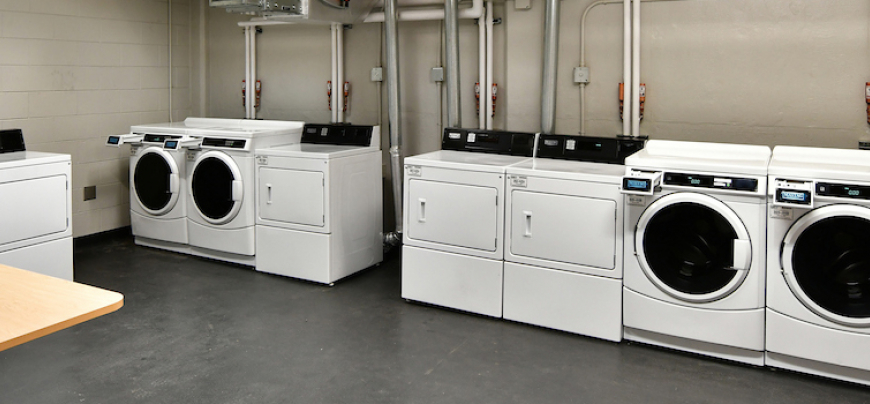
Laundry facilities are located in each hall in either the basement or individual communities, depending on the building. Laundry machines are free to residents. Each resident must provide their own detergent and dryer sheets. It is recommended that you use detergent pods, as they work best in our high efficiency machines. With the Laundry View app, you can also determine when a machine is available and/or when their laundry is done. If a machine isn't working, call the phone number on the machine for repair.
Please review these resources prior to using the machines:
Lost and Found
If you believe that you have lost any items, check with your area coordinator, the University Center Information Desk or University Police to see if the item has been turned into the campus lost and found.
Lockout
If a resident is temporarily locked out of their room (e.g. key is inside locked room), the resident should look for an RA who would be able to let them into their room (any RA in the building can assist the resident). If no RAs are available at the time, the resident should contact their area coordinator. A resident can also call the building's duty number to receive assistance; a list of numbers is located on page 58. Custodians and maintenance staff cannot allow a student back into their room.
Lost Keys
When a student loses their room key, they must contact Residence Life to request a lock change and a new key. When the lock is re-keyed, the locksmith will provide a new room key to residents who are present. Residents who are not present when the lock is changed can receive their new key from their hall staff.
There is a fee associated to replace a lost or stolen key. Please see the "Damages" accordion for the amount.
Mail and Packages
Mail: Learn more about mail processing, procedures and hours of availability at the Hathorn Mail Center webpage.
The Mail Center is open Monday-Friday from 8 a.m.-8 p.m. and Saturday-Sunday 2-6 p.m. as staffing allows. Hours are reduced prior to breaks and are very limited during breaks. Contact the Mail Center with questions regarding mail and packages at 715-425-0704 or hathornmailcenter@uwrf.edu The Mail Center is located in the Hathorn basement on the east side of the building.
Mail and Packages: Residents have secure mailboxes in their residence hall they can access with their room key. Envelope-sized mail is delivered to residence hall mailboxes Monday through Friday.
General Information
- Mail and packages must include the resident’s first and last name, building address and room number.
- Mail and packages incorrectly addressed may be returned.
- The university is not liable for stolen, lost or incorrectly delivered mail and packages.
- Packages for residence hall students are delivered to the Mail Center.
- Students will receive an email when they have a package to pick up from the Mail Center during business hours.
- Residents should inform family and friends not to send cash, gift cards or checks and to certify anything of value with the Post Office.
Carriers and Food
- Paper mail must be delivered by the U.S. Postal Service or by the university’s campus mail service. Delivery by any other method or the delivery of any other materials is prohibited.
- The Mail Center will only accept packages that arrive through contracted carriers including USPS, UPS, FedEx, FedEx Ground, DHL, Amazon Delivery and OnTrac or arrives properly addressed.
- The Mail Center will not accept food deliveries, store to door or any item not properly addressed.
- Food and other deliveries may be left in designated areas typically located in vestibules or outside of residence halls.
- The Mail Center may dispose of items not picked up within 12 hours.
- The Mail Center is not responsible for items that are missing, opened and/or consumed.
Perishables and Medication
- Perishable packages logged at the Mail Center must be picked up within 24 hours.
- Perishable packages not picked up within 24 hours may be discarded. Any item that appears to be damaged, leaking or spoiled may be discarded within 24 hours.
- If you need to ship medication including medication that needs to be refrigerated, it is strongly recommended contacting a local or on campus pharmacy to receive and store the items, as the Mail Center is not open 24 hours a day, deliveries may be delayed in being processed and there is limited refrigerated space available.
Returns
- The Mail Center will not mail packages or accept return packages for residents.
- Packages unable to be returned to sender will be considered abandoned property after 30 days from date of receipt and discarded.
- All packages received for off-campus residents will be returned to sender. Packages cannot be forwarded to an alternate address.
- Packages not picked up after 15 days will be returned to sender.
Additional Package Information
- The Mail Center will not sign for any mail/packages that require a 21+ signature. Students will need to arrange to pick these items up directly from the courier. It may be that on occasion, such packages will be returned to the sender.
- Packages shipped to the residence halls marked as containing hazardous materials or which contain prohibited items may be returned to sender.
- Residents must meet directly with a carrier for any deliveries that require a passcode. Residence hall front desks and package centers will not accept delivery passcodes from residents.
Mail Forwarding
For six months after a student moves out of their residence hall room, only first class and priority letter mail will be forwarded to the mailing address that the student has provided in eSIS. If this address is not correct or is not where they wish to have their mail sent, it is the student’s responsibility to change their mailing address in eSIS. Any packages received will be returned to sender.
Prior to leaving the residence hall for the summer break, residents should update their mailing addresses in eSIS, with companies, family members and friends to ensure they get their mail.
Parking
On-campus parking information, including information about parking lots near the residence halls, is available from the Parking Office or by visiting the Parking website. Students should contact the Parking Office regarding any parking-related needs.
Repair and Maintenance
- General Maintenance and Custodial: Student assistance in reporting maintenance or custodial conditions in our residence halls is essential. If you have concerns regarding maintenance or custodial conditions, please submit a work order.
- Elevators: Elevators are available in Ames and South Fork Suites, as well as Crabtree, Hathorn, Johnson and May Halls. If an elevator isn't working, inform Residence Life staff immediately.
- Heat: Residents are able to make adjustments to the level of heat in their rooms. If you believe the room is too hot or cold, you should contact residence hall staff. Personal heating units are not permitted.
- Lightbulbs: If a lightbulb in a your room burns out, submit a work order to have the light bulb replaced as soon as possible.
- Microwave and Mini Fridge Units: MicroFridge units are provided in most residence hall rooms. The microfridge units have a refrigerator, freezer and a microwave. Separating the unit is considered vandalism and you may be charged restitution for the repair of the unit. It's advised that students defrost their refrigerator/freezer at least once during the academic year. Instead of microfridge units, South Fork Suites include a kitchenette which has a full-size refrigerator and microwave.
SWANK Cinema
Did you know that as an on-campus resident, you have unlimited access to a customized streaming platform that features top movies and shows? And you can access it anywhere on campus, at any time, with no additional cost to you? The platform is available on all personal devices, plus new movies are added monthly to ensure content is always new, relevant and wide-ranging so everyone’s interests are met!
Trash and Recycling
Residents are responsible for removing trash and recycling on a regular basis to maintain cleanliness. Trash and recycling should be placed in the appropriate receptacles located outside each residence hall.
Vending Machines
Vending machines are located within each residence hall and accept cash and credit cards. If you experience any issue with the vending machines, contact the phone number located on the machine to address your concerns. You can also work through vending machine issues or refunds at the University Center’s Information Desk.
Student Rooms
Air Conditioning
We are offering an option for students to apply to bring their own, free-standing, floor air conditioning unit to their rooms!
Ames Suites, May Hall and South Fork Suites are equipped with air conditioning. Students living in buildings without air conditioning can apply to bring their own in the residence halls.
A limited number of applications per building will be approved. Applications will be reviewed and considered in order of submission on a first-come, first-served basis. Further details will be communicated to those with accepted applications. Should you be accepted, a $100 utility and administrative fee will be charged to your student account per academic year.
Students with medical conditions may request an air conditioner from the university via the housing accommodations process. Please visit the Disability Resource Center website for more information. These units will be provided by Residence Life staff and remain in the window for the duration of the academic year.
Bed Lofts
Each room is equipped with the components for a student to properly loft their bed. Students should refer to the Move Out webpage for instructions on how to leave the bed.
Furnishings
Each room is furnished with a loftable bed, dresser, study desk, closet rod and a desk chair for each student living in the space. Room furnishings may not be removed from the room. A microfridge unit (microwave and fridge) is available for roommates to share (excluding South Fork Suites). Students are not permitted to bring additional refrigerators, freezers or microwaves.
Heat Information
If you believe that your heat is not functioning properly, please submit a work order
Ames Suites
- Hot water radiation heat.
- Chilled water cooling.
- Forced air coil unit.
- Temperatures are controlled by the thermostat in each bedroom.
- The blower fan operates whenever there is a demand for heat or cooling and the outside air temperature shows a need for it.
- The fan will turn off when the room temperature setting is reached.
- The maximum heat setting is 70 degrees. You may set it lower than that.
- The lowest cooling setting is 71 degrees. You may set it higher than that.
- The fan will not operate between 70 and 74 degrees and will also turn on automatically to keep the pipes from freezing.
- Please keep all items at least 12 inches from your heater to allow air flow.
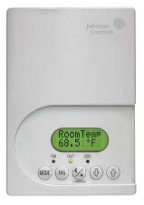
Crabtree and Parker Hall
- Hot water radiation heat.
- The water temperature is set by outside air temperature.
- The natural convection airflow through the heater in your room is controlled by a manual damper.
- By turning the knob on the front of the heater you either open or close a damper (door) inside the louvers.
- If the damper is open, cool air from the floor will rise through the heating coil and come out the louvers.
- If the damper is closed or the heater bottom is blocked, no heat will come out.
- Use a flashlight to look in through the louvers to see if the damper is open or closed.
- Control rooms for Crabtree and Parker Hall are 401, 404, 410, 413, 423, 429, 432.
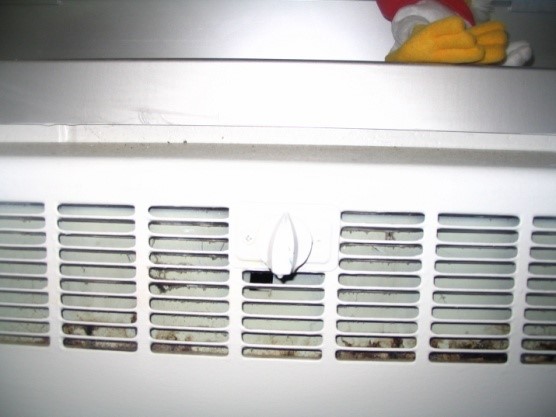
Grimm and McMillan Hall
- Hot water radiation heat.
- The water temperature is set by outside air temperature.
- The natural convection airflow through the heater in your room is controlled by a manual damper.
- By turning the knob on the front of the heater you either open or close a damper (door) sitting on top of the heating coil.
- When the damper is up (open), cool air from the floor will rise through the heating coil and come out the louvers.
- When the damper is down (closed) or the heater bottom or top louver is blocked, no heat will come out.
- Use a flashlight to look down through the louvers to see if the damper is opened or closed.
- Control rooms for Grimm and McMillan Hall are 401, 405, 409, 413, 424, 428, 432, 436
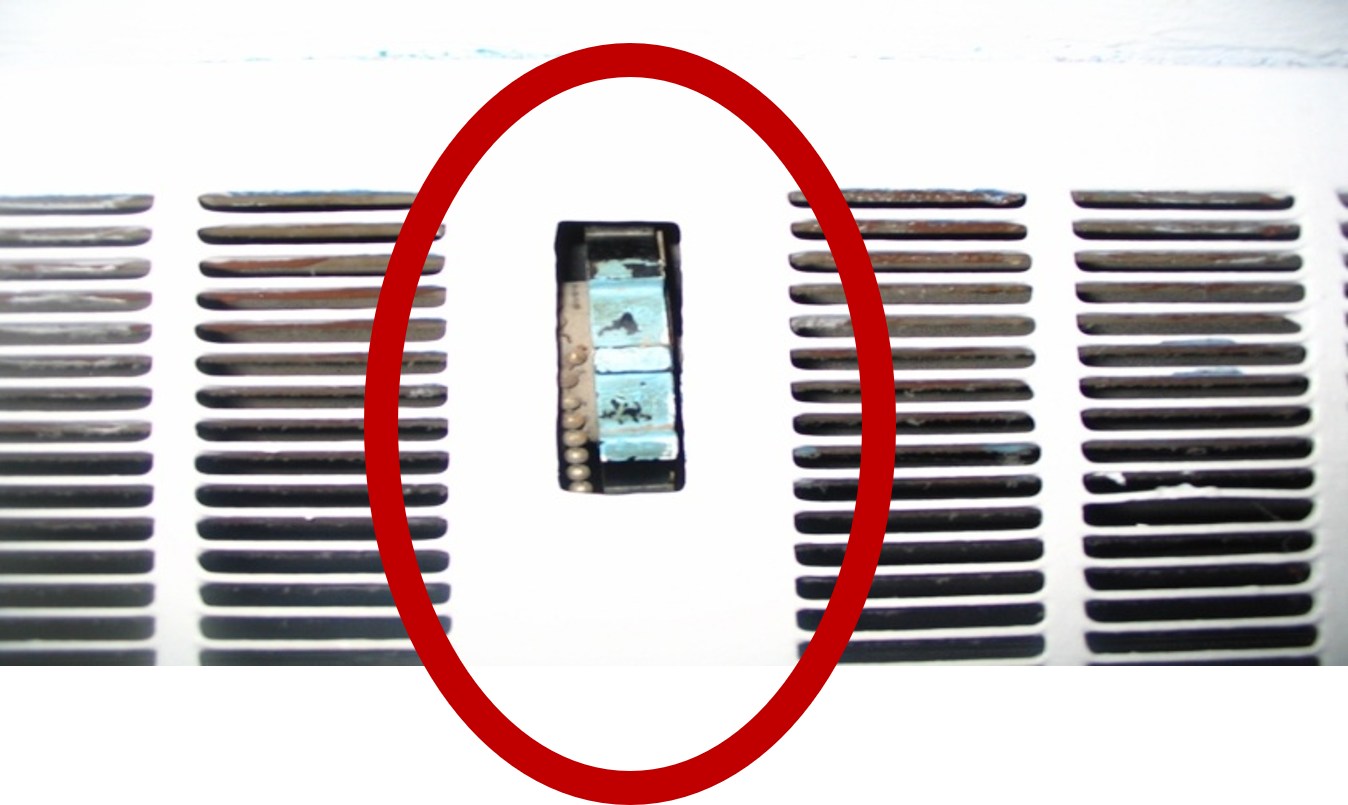
May Hall
- Hot water radiation heat.
- Chilled water cooling.
- Forced air coil unit.
- Temperatures are controlled by the thermostat in each bedroom.
- The unit operates whenever there is a demand for heat or cooling and the outside air temperature shows a need for it.
- The fan will turn off when the room temperature setting is reached.
- The heating range is from 60 to 70 degrees.
- The cooling range is from 71 to 80 degrees.
- Please keep all items at least 12 inches from your heater to allow air flow.
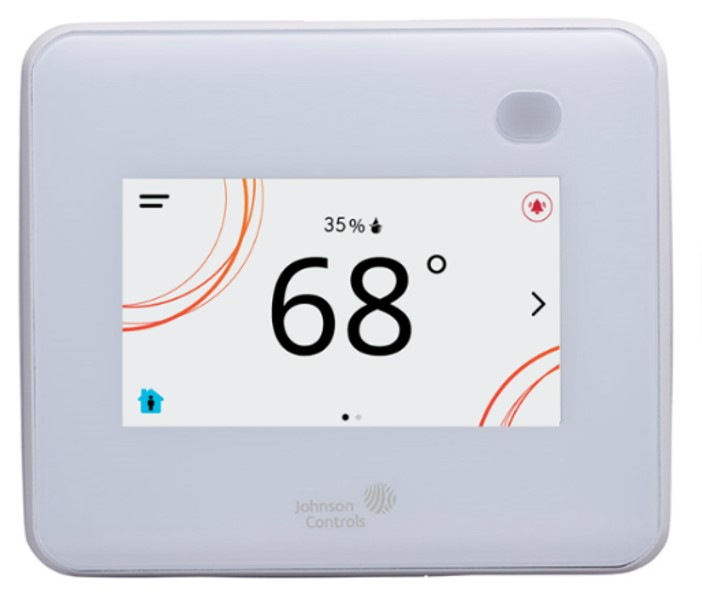
Prucha Hall
- Steam radiation heat.
- The heat in each room is limited by a knob on the steam valve.
- The knob may only turn ½ to ¾ turn from closed to open.
- Your heater may “crackle and bang” when the zone valve opens due to thermal expansion.
- Your knob can only limit the heat in your room when the zone valve is opened, it cannot turn the heat on.
- Please keep all items at least 12 inches from your heater to allow air flow.
- Four rooms do not have knobs: 302, 316, 318 and 334. These are control rooms for ¼ of the building. The Building Automation System monitors these four rooms to control the four zone valves in the basement.
- When the control room is satisfied, the zone is turned off.
- When the control room is below setpoint, the zone valve opens, allowing steam to go to the zone.
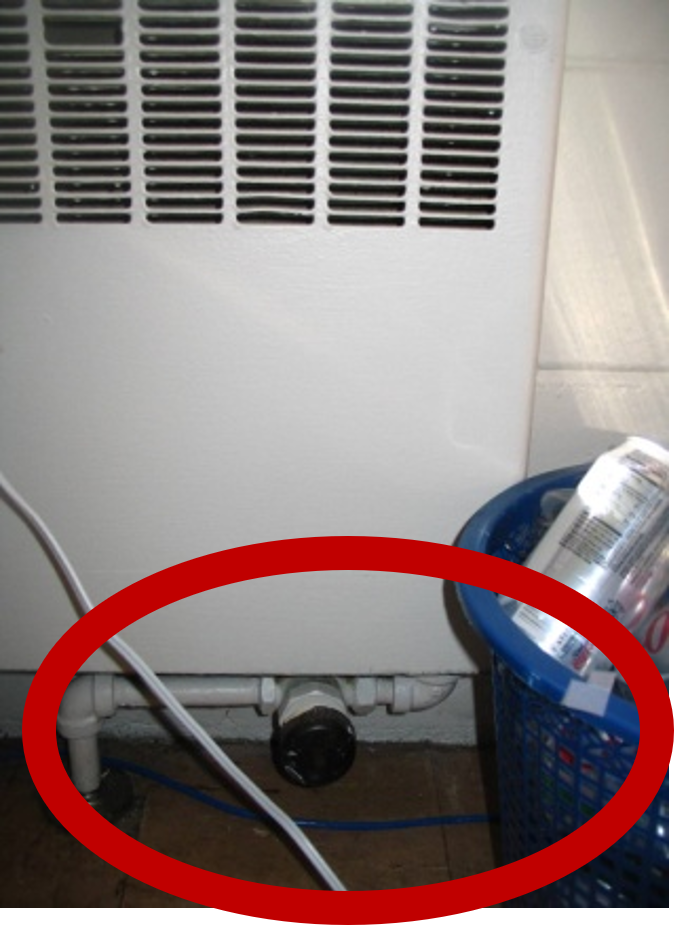
East Hathorn Hall
- Steam radiation heat.
- The heat in each room is limited by a knob on the steam valve.
- The knob may only turn ½ to ¾ turn from closed to open.
- Your heater may “crackle and bang” when the zone valve opens due to thermal expansion.
- Your knob can only limit the heat in your room when the zone valve is opened, it cannot turn the heat on.
- Please keep all items at least 12 inches from your heater to allow air flow.
- Three rooms do not have knobs: 301, 304 and 325. These are control rooms for ⅓ of the building. The Building Automation System monitors these three rooms to control the three zone valves in the basement.
- When the control room is satisfied, the zone is turned off.
- When the control room is below setpoint, the zone valve opens, allowing steam to go to the zone.
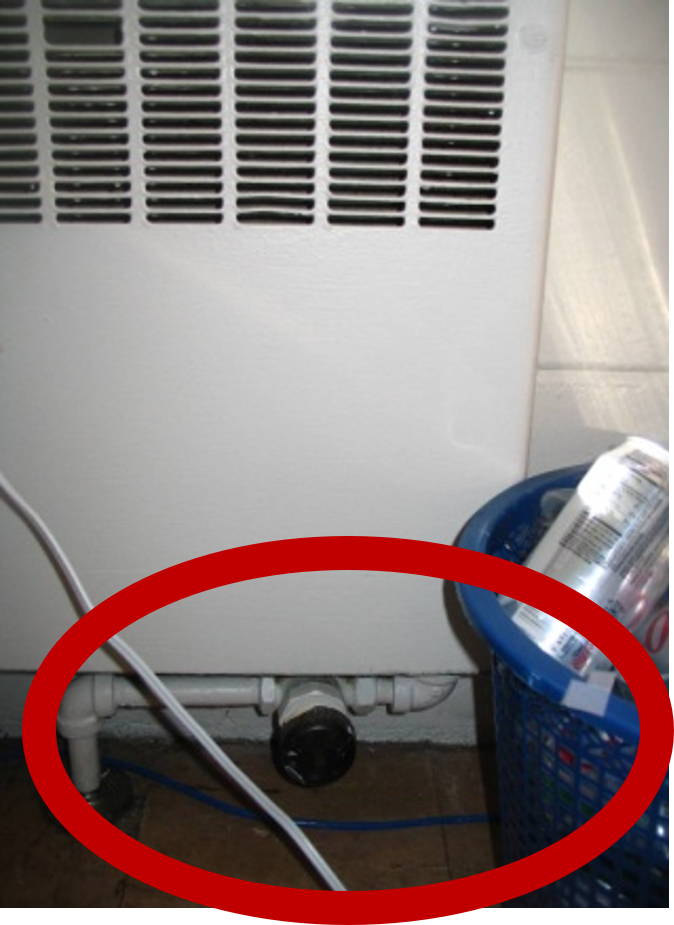
Center Hathorn
- Hot water radiation heat.
- The heat in each room is controlled by the thermostat.
- The heating range is from 60 to 70 degrees.
- Cool air from the floor will rise through the heating coil and come out the top louvers by convection, there is no fan inside the heater.
- No heat will come out if the heating valve is closed by the thermostat or the heater bottom or top louver is blocked.
- Please keep all items at least 12 inches from your heater to allow air flow.
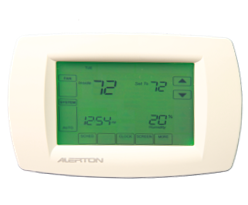
West Hathorn Hall
- Steam radiation heat.
- The heat in each room is limited by a knob on the steam valve.
- The knob may only turn ½ to ¾ turn from closed to open.
- Your heater may “crackle and bang” when the zone valve opens due to thermal expansion.
- Your knob can only limit the heat in your room when the zone valve is opened, it cannot turn the heat on.
- Please keep all items at least 12 inches from your heater to allow air flow.
- Two rooms do not have knobs: 357and 382. These are control rooms for ½ of the building. The Building Automation System monitors these two rooms to control the two zone valves in the basement.
- When the control room is satisfied, the zone is turned off.
- When the control room is below setpoint, the zone valve opens, allowing steam to go to the zone.
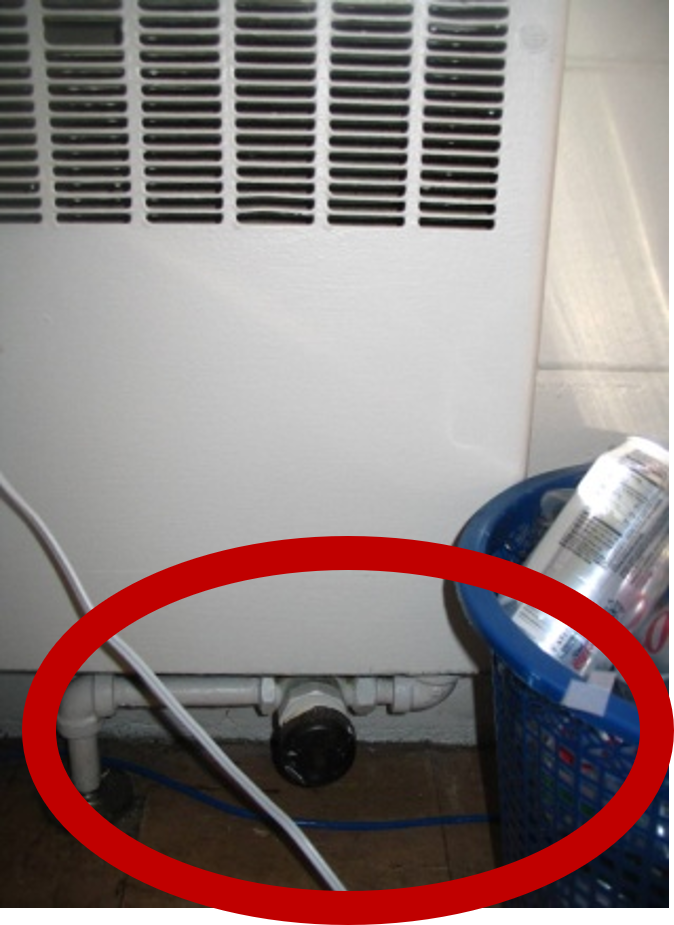
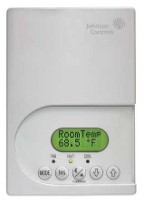
Johnson Hall
- Hot water radiation heat.
- The heat in each room is controlled by the thermostat.
- The maximum heat setting is 70 degrees. You may set it lower than that.
- Cool air from the floor will rise through the heating coil and come out the top louvers by convection, there is no fan inside the heater.
- No heat will come out if the heating valve is closed by the thermostat the heater bottom or top louver is blocked.
- Please keep all items at least 12 inches from your heater to allow air flow.
Stratton Hall
- Hot water radiation heat.
- The water temperature is set by outside air temperature.
- The natural convection airflow through the heater in your room is controlled by a manual damper.
- By turning the knob on the front of the heater you either open or close a damper (door) inside the louvers.
- When the damper is open, cool air from the floor will rise up through the heating coil and come out the louvers.
- When the damper is closed or the heater bottom or top louver is blocked, no heat will come out.
- Use a flashlight to look in through the louvers to see if the damper is open or closed.
- Four rooms do not have knobs: 301, 302, 339, 340. These are control rooms for the building.

South Fork Suites
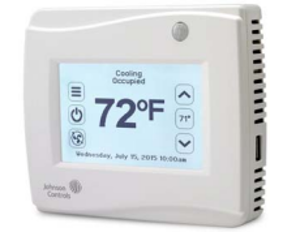
- Temperatures are controlled by the thermostat in each common living space.
- The unit operates whenever there is a demand for heat or cooling and the outside air temperature shows a need for it.
- The fan will turn off when the room temperature setting is reached.
- The heating range is from 55 to 70 degrees.
- The cooling range is from 71 to 80 degrees.
- Air is delivered into every room of your suite at the same temperature.
- The unit will run for at least 30 minutes every 2 hours to circulate the air in the suite and bring in air from the hallway.
Mattresses
Mattresses are provided as part of the furnishings and measure 80” X 36” and are 8” thick. Twin extra-long sheets are recommended.
Microfridge Units
Microfridge units are provided in most residence hall rooms. The unit contains a separate freezer and fridge area with a microwave connected to the fridge. Separating the unit is considered vandalism and a resident may be charged restitution for the repair of the unit. It is advised that students defrost their refrigerator/freezer at least once during the academic year. See checkout procedures for instructions.
Instead of microfridge units, the George R. Field South Fork Suites includes a kitchenette which has a full-size refrigerator and microwave.
Light Bulbs
If a light bulb in a student’s room burns out, they should report it through the campus work order system TMA. Staff will replace the light bulb as soon as possible.
Maintenance
Room and Hall Repairs
To submit a request for a repair in your hall, please click the button to be directed to the Facilities Work Order Request Form. Need help submitting your request? Check out the handy explainer images below for guidance on how to submit your work order.
Maintenance Requests
(for non-emergency repairs)
The online maintenance request form provides an easy way to request non-emergency requests, such as:
- Light bulb replacement
- Sticky locks
- Window screens replacement
- Furniture repairs
- Doors that are sticky, squeaky, hard to open or close, but are otherwise operational
- Shower heads that are not working
- Problems with insects in rooms
Current residents may fill out a maintenance request by clicking the button below. Parents/families should not submit requests on their students’ behalf.
Emergency Repairs
Contact an area coordinator, community assistant or resident assistant for emergency requests, such as:
- Keys stuck in locks or resident room locks that aren’t working at all
- Non-resident room doors that are not closing/locking properly
- Doors that are unlocked that should be locked, doors that are locked that should be unlocked
- Beeping smoke detectors
- Mess that needs cleaning up (vomit, food/drink spills, blood, urine, broken glass, etc.)
- Elevators that are malfunctioning
- Malfunctioning equipment that cannot wait until the next working day (overflowing toilets, faucets that won’t shut off, etc.)
- Vital equipment that needs replacing (all toilet paper missing from a bathroom, all light bulbs removed from an area, etc.)
- Problems with heat in rooms
- Broken windows
Tips on how to make a work order
- Visit the iService work order request form.
- Select "Residence Hall Requests."
- In the fields marked "Building, Location ID and Area", select your building, room number and, if in a suite, the area (ex: bathroom, living, etc.)
- You will have the option to add files in the "Attached Files" field. Photos or videos of the damage/issue can be uploaded and submitted here.
- Make sure to hit the "Submit" button just one time!


Residence Life
Monday-Friday, 7:45 a.m.-4:30 p.m.