
Move In
Welcome to campus! Whether you're new to UWRF or a returning Falcon, we're excited that you're joining us in the residence halls this year! This page contains all the resources you need to make a smooth transition into your new living space. Check back frequently for updates.
Fall 2026 Move In
- Saturday, Aug. 29: New and transfer student Move In, welcome activities and meal plans begins
- Sunday, Aug. 30: Returning student move in starts
- Tuesday, Sept. 1: Move In ends
- Wednesday, Sept. 2: First day of classes
More information to come over the summer. Please check your UWRF email frequently!

Key Resources
- Technology in the Halls
- Residence Halls
- Recommended Packing List
- Room Design
- Roommate Tips and Agreement (see pages 53-55)
- Parking
- Campus Map
Find your room and roommate details
If you have an assigned room for the upcoming academic year, follow the instructions here to log in to the Housing Portal and view your details, and details about your roommate (if any).
To view your room assignment details:
- Log into the Housing Portal.
- Enter the 2026-27 Housing and Meal Plan Contract.
- Go to the "My Room Assignment" page. You may need to click on a page before the "My Room Assignment" page then click "Save and Continue" at the bottom of each page until you get there.
- To view your roommate (if any) and their profile details, including email address, click on the "View Profile" link next to their name.
Student ID card: get yours online now!
Incoming new students:
If you haven't done this already, please do this online now, don't delay!
- Your student ID card grants you access to the front door of your residence hall and other resources on campus like your meal plan.
- ID card submission deadline (Sunday, Aug. 23): Incoming students must submit their personal photo for their ID card. Be sure to follow the photo requirements!
- If you don’t submit your photo, then be prepared for an extended wait time during Move In weekend.
- ID cards will be picked up with your hall room key at your residence hall during Move In weekend beginning Saturday, Aug. 29.
- Are you arriving before August 29 for an approved reason? Then follow special move in instructions that will be emailed to you by Residence Life before your arrival.
Returning students:
ALL students living on campus for 2026-2027 will be receiving a new student ID card with secure technology. Your old ID card will no longer work for access to the residence halls, meal plans and other campus services and resources.
- Your new ID card will be picked up with your hall room key at your residence hall during Move In weekend beginning Saturday, Aug. 29, for incoming students and Sunday, Aug. 30, for returning students.
- Are you arriving before August 29 for an approved reason? Then follow special move in instructions that will be emailed to you by Residence Life before your arrival.
The Carding Office is open:
- Before Move In weekend: Monday-Friday 7:45 a.m.-4:30 p.m.
- Saturday, Aug. 29: 8 a.m.-6 p.m.
- Sunday, Aug. 30: 10 a.m.-4 p.m.
- Monday, Aug. 31: 7:45 a.m.-4:30 p.m.
- Tuesday, Sept. 1: 7:45 a.m.-4:30 p.m.
If you have not submitted your photo, you will need to go to the Carding Office BEFORE collecting your room key to obtain your ID. For more information, please visit the Carding Office’s website.
How do I sign up for a Move In date and time?
Signing up for Move In
- In early August, all students living on campus will receive an email to their UWRF email address with details about how to log into the Housing Portal and sign up for a Move In date and time.
- Incoming Students Move In: Saturday, Aug. 29-Tuesday, Sept. 2
- Returning Students Move In: Sunday, Aug. 30-Tuesday, Sept. 2
Sign up for a Move In time:
- Students may log into the Housing Portal and visit the "Move In Signup" page to choose a Move In date and 30-minute timeslot. For each move in day, there will be a specific number of Move In timeslots per hour to limit traffic in the halls and to provide an orderly experience for students and families.
- You can pick a timeslot during the following windows:
- Incoming Students: Tuesday, Aug. 11, 8 a.m.-Sunday, Aug. 23, 11:59 p.m.
- Returning Students: Wednesday, Aug. 12, 8 a.m.-Sunday, Aug. 23, 11:59 p.m.
- Step-by-step guide: Move In sign up
- Can I change my Move In date or time after I choose one? Yes, you may log into the Housing Portal at any time during the above dates and change your Move In date and time.
- What happens if I don't choose a Move In timeslot? You will be randomly assigned to a Move In day and time.
How do I check into my room?
Fall 2026 Move In
- In the Housing Portal, each student will select a 30-minute Move In timeslot on a date between Aug. 29 and Sept. 2. Your move-in day and time will be displayed on the "My Room Assignment" page in the portal. This information will also be emailed to your UWRF email address prior to Move In Day.
- Your 30-minute move-in timeslot is when you will unload your vehicle near your residence hall. Once unloaded, the vehicle must be moved to a parking lot and you can continue to unpack at your leisure.
- After your vehicle has been moved, you'll go inside the hall, receive your UWRF student ID and room key and begin bringing your things inside to your new room.
Move In Traffic
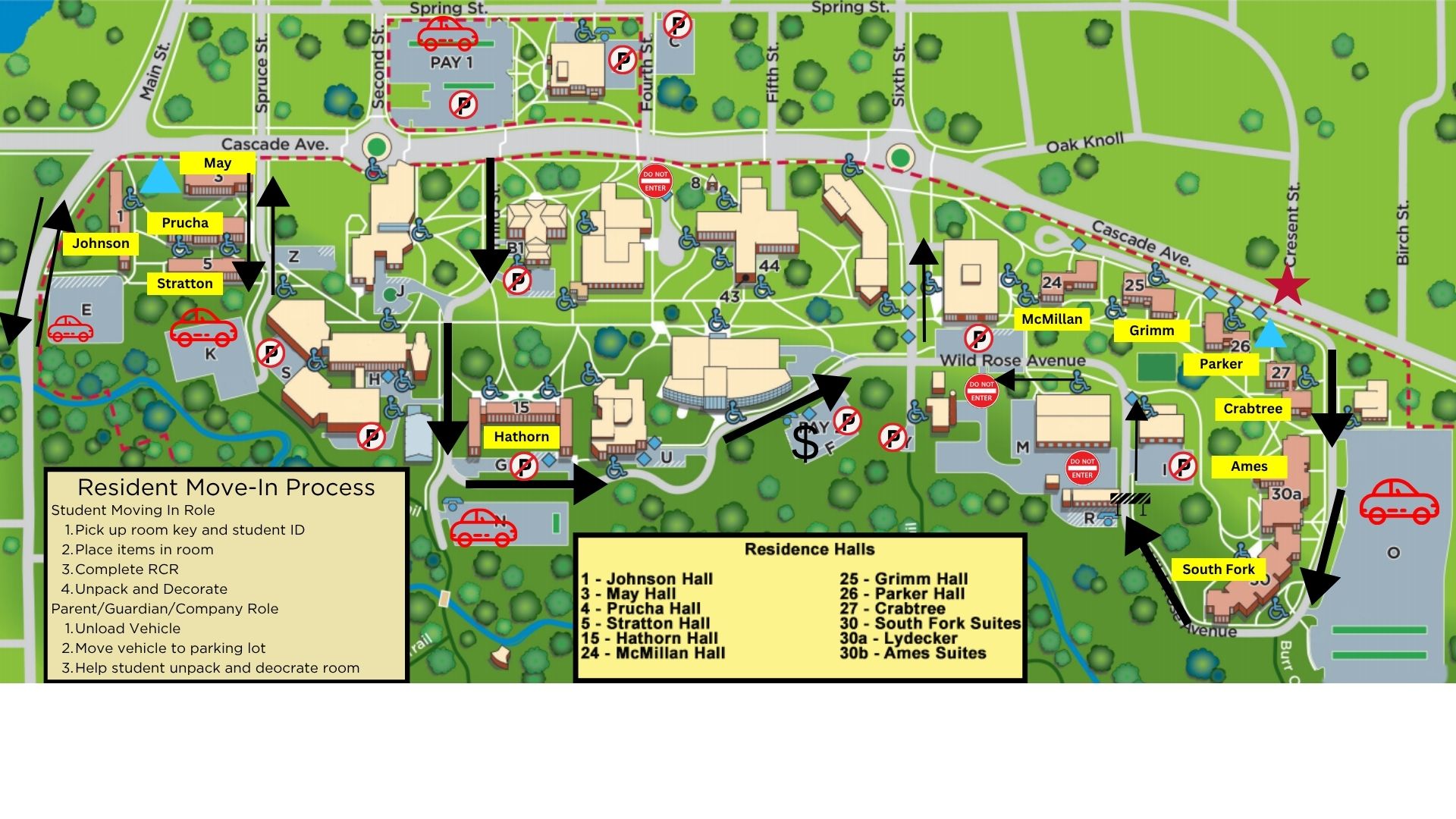
During New Student Move In on Aug. 29 from 8 a.m. to 4:30 p.m., some roads on campus will be converted to one-way streets. This will allow traffic to flow smoother and prevent extreme congestion at popular entrances and exits.
One-way streets will include:
- Wild Rose Avenue: Located on the east side of campus (in front of McMillan, Grimm, Parker, Crabtree, Ames Suites and South Fork Suites). You'll enter Wild Rose Avenue from Cascade Avenue and then the traffic will have you flow around the buildings where you can then exit from 6th Street.
- 3rd Street: Located between SciTech and South Hall. You will enter 3rd Street from Cascade Avenue and keep following the road around campus to exit on 6th Street.
- 6th Street: This will be an exit for most of the traffic occurring on campus, which may lead to a short wait to exit.
Move In Parking
- You must unload your vehicle quickly and move your vehicle to one of the following lots (for short term two hour parking):
- O Lot (Please watch signs as all exits will be left turn only during Move In.)
- N Lot
- K Lot
- E Lot
- Once you have your items in your room, you must move your vehicle. Permit holders must move your vehicle to your permit lot. If you or your visitor do not have an annual permit, you can purchase temporary parking online and move your vehicle to PAY3 (rows 3-12) or park and pay in pay by space parking or park on the city streets.
- PAY1 Lot, Saturday, Aug. 29 from 7 a.m.-9 p.m., no payment required. (All other dates and times, a payment is required via pay station or by mobile pay.)
- PAY2 Lot, payment required (via pay station or by mobile pay).
- PAY3 Lot, Annual Permit, Temporary Permit or payment required (via pay station or by mobile pay).
- Please visit the Student Parking website for more information regarding parking passes and parking lots.
Are moving carts provided?
Each residence hall has a limited number of large red moving carts as well as rubber mallets, which are used to adjust the height or loft the bed. Those who use the large red moving carts are asked to return them to the lobby in a timely manner to allow others to access the carts. Students and families are welcome to bring their own dollies, carts, etc.
Can I move in early?
Welcome activities for incoming students and meal plans, start on Saturday, Aug. 29. Not all requests to move in early will be approved. Students who have a valid reason to move in prior to the assigned move in date should visit the Early Arrival Request webpage for further information.
How do I connect to the WiFi?
Learn how to connect to the WiFi, register items such as gaming systems and streaming devices and connect to the Guest Network prior to moving in.
What is my mailing address?
Learn more about mail and your hall mailing address.
Can I request to have my bed lofted?
A loft kit is available in each residence hall room. Residence Life will assist as able when requested during Move In. Rubber mallets are used to adjust bed height and loft beds. A limited number of rubber mallets are available in each residence hall. Students are welcome to bring their own rubber mallet. View the "How to Loft Your Bed" video for more information.
What do I need to bring to campus?
To prepare for life in the residence halls, review the suggested packing list. This list includes a variety of things to consider bringing to campus. Please also review the section of this page that lists items you should NOT bring to campus and what is provided in each room. Keeping a clean and organized space is helpful to creating a healthy roommate relationship and achieving academic potential!
What You Need
- School supplies
- Identification information, including your student ID and something such as a driver’s license
- Noise canceling headphones
- Clothing
- Laundry supplies, including a hamper, hangers, detergent and dryer sheets
- Two sets of twin extra long sheets, pillow, blanket, bath and hand towels
- Personal hygiene items
- Bathroom tote and shower shoes
- Water bottle/travel mug
- First aid/general health kit
- Cleaning supplies (nothing containing bleach or ammonia)
- Medical information including
- Names and phone numbers of primary and specialty care provider
- If you do not have insurance, you will have access to healthcare services through Student Health Services
- Download our recommended packing list for full details!
What do I need to leave behind?
Please leave these items at home!
- Wireless printer (printer and copy machines are available on campus!)
- Refrigerator and microwave
- Halogen lights/lamps
- Hot plates or open heating coil appliances
- Items requiring open flames such as candles, oil lamps and incense
- Foam-backed carpeting or foam pads used under carpeting
- Pets (exceptions are harmless fish in 10 gallon or smaller aquariums)
- Fireworks or other explosives, as well as dangerous weapons, including but not limited to guns (also airsoft, pellet and paintball), rifles, bow and arrows, crossbows, large sporting or hunting knives, swords or spears
What's provided in my room?
A variety of items are provided in every room on campus (extended housing spaces may vary). A full list of room dimensions and amenities is provided on each individual residence hall webpage. Students are not permitted to remove or store any of the provided room furnishings outside of the residence hall room.
- Microwave/refrigerator unit
- Loftable bed unit
- Twin XL mattress
- Desk and desk chair
- Bookshelf
- Dresser/wardrobe/closet
Dining Services
Meal plans start on August 29 at 7 a.m. Family and supporters are welcome to a free meal in Riverside on August 29. Please check the Dining Services website for more information about meal plans.
Helpful How Tos
Check out the below video for helpful tips for lofting your bed.
Residence Life
Monday-Friday, 7:45 a.m.-4:30 p.m.